
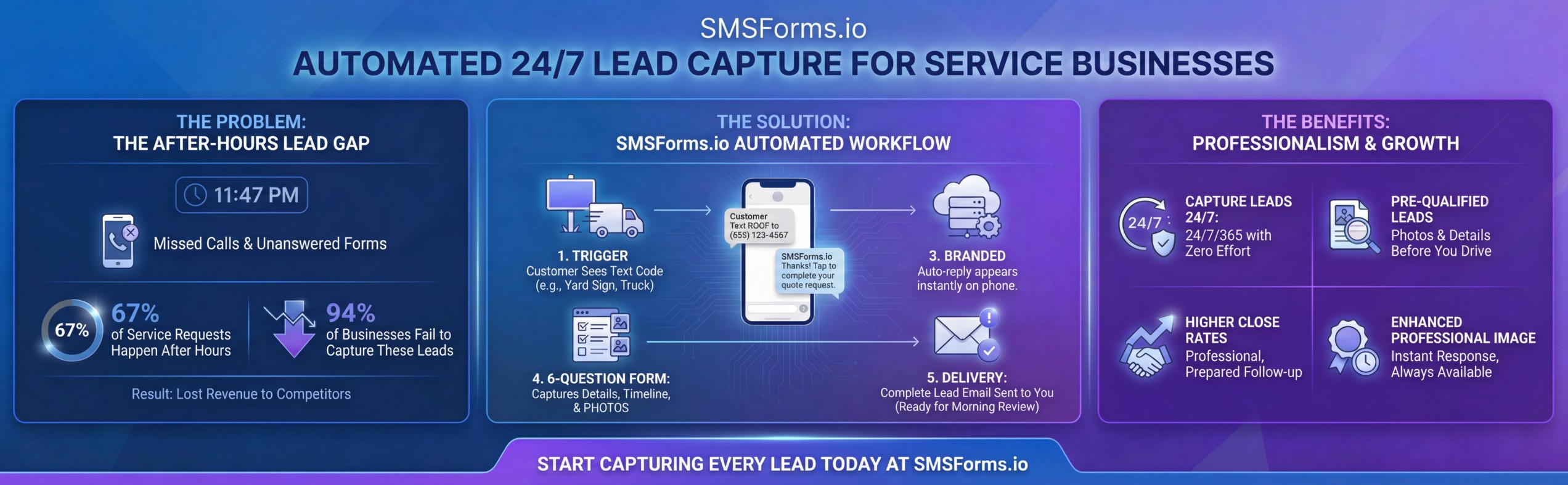
It's 11:47 PM on a Tuesday. Your phone rings. You're asleep.
By the time you see the missed call notification at 6:30 AM, that potential $12,000 roof replacement has already called three of your competitors. One of them answered...or at least, their system did. You just lost the job before your day even started.
This isn't a hypothetical scenario. This is happening to your business right now. While you read this sentence, someone in your service area needs exactly what you offer. They're searching on their phone. They're ready to spend money. And if you're like 94% of service businesses, you're about to lose them.
Here's the brutal truth that keeps successful contractors up at night (ironically, while capturing leads from customers who can't sleep): 67% of all service requests happen outside normal business hours. Nights, weekends, holidays...the times when traditional businesses are closed and unavailable.
Let me paint the full picture of what you're losing:
Read that last number again. $100,000+. That's not revenue you failed to generate...that's revenue you earned the right to, but lost because someone couldn't reach you at 11 PM on a Tuesday.
But here's where it gets interesting. While you were sleeping, eating dinner, at your kid's soccer game, or finishing up a job, your business isn't growing. Not because you're bad at your job. Not because your prices are wrong. Not because your marketing doesn't work.
You're competing in a 24/7 world with a 9-5 lead capture system.
Before we go further, let's address the elephant in the room. You've probably tried to solve this problem. Maybe you've even spent money on solutions that promised to fix it. Let's talk about why they failed.
Cost: $35,000-$50,000 per year for a part-time answering service or virtual assistant.
The problem? They don't know your business. They can't answer technical questions. They're reading from a script. Customers can tell. And you're paying someone to essentially say "someone will call you back tomorrow" in a more expensive way than voicemail does for free.
One contractor told me he spent $42,000 on an answering service only to find out they were so bad at qualifying leads that 60% of the appointments they booked were time-wasters. He went back to missing calls.
You spent $2,500 on a beautiful new website. It has a "Free Quote" form. It looks professional. It should work.
Here's what actually happens:
Jessica runs a landscaping company in Dallas. She tracked her $2,500 website for three months. Google Analytics showed 1,247 visitors. Only 89 people started the quote form. Just 19 completed it.
That's a 1.5% conversion rate.
AI is hot right now, so someone sold you on a chatbot. It's on your website. It pops up and asks "How can I help you today?"
Here's what customers actually think when they see it:
And they're right. Chatbots break. They misunderstand. They give wrong information. They frustrate customers. And the worst part? You spent $100-300 per month on technology that's actually preventing leads from reaching you.
This is what most contractors tell themselves. "I'll call everyone back first thing tomorrow."
82% of your potential customers have already booked someone else by morning.
Think about it from their perspective. Their water heater is leaking. It's 9 PM. They Google "emergency plumber near me" and call the first five companies. You're number three. You don't answer. But company number four does...or their system does.
Who do you think gets the job?
Let me show you exactly where your money is going. These aren't abstract problems. These are specific, measurable ways you're losing revenue every single day.
A business might have a 4.9-star rating on Google. But most companies like this have a problem they don't know exist until they measure it.
Their business phone rang ~300 times.
He answered ~220 calls.
That's an ~73% answer rate (which is good).
Of the ~80 missed calls, only 15 left voicemails. He called all 80 back. He reached 15 and booked 4 jobs.
He lost 65+ potential customers in one month by missing the initial phone call.
Let's do the math if it's an HVAC company. A typical HVAC job is ~$4,000. If even 10% of those missed calls would have converted (which is conservative), that's 8 jobs. That's ~$32,000 in lost revenue. In one month.
The most frustrating fault is that it wasn't their fault. They were doing their job....installing air conditioners. They were driving to appointments. You can't answer every phone call and also run an HVAC business.
The phone call itself is the problem.
Why consumers don't want to call anymore:
Here's what the top 6% figured out: Remove the phone call from the first touch entirely.
Instead of "Call us at (555) 123-4567" on their trucks, yard signs, and ads, they say: "Text HVAC to (555) 123-4567"
The customer gets an instant response...even at 11 PM on a Sunday. No ringing phone. No waiting. No voicemail. Just immediate engagement. The psychological difference is massive.
Remember Jessica's landscaping company?
Here's what was happening. Google Analytics told the surface story: 1,247 visitors, 89 form starts, 19 completions. But the real story was in the user behavior flow.
Here's the journey of a typical mobile visitor:
Name: (types on mobile keyboard)
Email: (types on mobile keyboard)
Phone: (types on mobile keyboard)
Address: (types on mobile keyboard)
What service do you need: (dropdown with 15 options)
Describe your project: (large text box, now they have to think and type paragraphs)
Property size: (another dropdown)
When do you want to start: (date picker that's broken on mobile)
Budget range: (feels intrusive to answer)
Submit button
By field 6, they get a text message from a friend. They switch apps. They forget to come back. Lead lost.
Or they complete the entire form, hit submit, and see: "Thanks! We'll contact you within 24-48 hours."
24-48 hours? Your competitor's system responded in 30 seconds. Who do you think they're going with?
The math on web forms is absolutely brutal:
But here's what makes this particularly painful: You spent money to get that traffic. Whether it's SEO, Google Ads, Facebook marketing, or just word of mouth...that person found you. They were interested. They started your form. And you lost them because filling out a form on a mobile phone feels like homework.
This one hits different because it's invisible money you never knew you were losing.
A concrete company in Virginia completed 127 jobs last year. Beautiful driveways, patios, walkways...work they're proud of. After every job, they puts up a yard sign: "Another Beautiful Driveway by Tony V's Concrete" with his phone number.
Those signs sit in neighborhoods for 30-60 days (until the homeowner takes them down). During that time, an average of 200+ neighbors drive by every single week. That's 1,200-2,400 impressions per sign. That's 152,000-304,000 total impressions from his 127 signs.
This company tracked leads methodically. They asked every caller: "How did you hear about us?"
Out of those 152,000-304,000 sign impressions, he got 8 leads that mentioned seeing a yard sign.
That's a 0.003% to 0.005% conversion rate.
Think about what's happening here. Someone drives by and thinks: "Wow, that driveway looks amazing. I need to get our driveway done. Who did this?"
Then one of four things happens:
The sign is doing its job...it's catching attention, showing quality work, building brand awareness. But it's failing at the only thing that actually matters: capturing the lead.
Here's the crazy part. Each of their completed jobs should be generating 5-10 neighbor leads minimum. That means instead of 8 leads from 127 signs, they should be getting 635-1,270 leads.
Let's be conservative and say 635 leads. Their average job is $6,800. Their close rate is 25% (typical for concrete). That's 159 jobs from yard signs alone. That's $1,081,200 in revenue they left on the table because their yard signs had a phone number instead of a text code.
Now here's where everything changes. Let me show you the system that the top 6% of contractors use to capture leads 24/7, without hiring staff, without expensive chatbots, and without complexity.
It's not AI. It's not a chatbot. It's just brilliantly simple automation.
When I first discovered this, I was confused. These top-performing contractors weren't using sophisticated artificial intelligence. They weren't hiring virtual assistants in the Philippines. They weren't spending hours every day managing text message conversations.
They were using something that sounds almost too simple to work: automated SMS forms.
They're driving through a neighborhood and see a yard sign: "Like this deck? Text DECK to (804) 123-4567"
Or they're stuck in traffic behind your work truck that says: "Need your AC fixed? Text HVAC to (555) 123-4567"
Or they're scrolling Facebook at 10 PM and see your post: "Free estimates! Text ESTIMATE to (555) 123-4567"
They pull out their phone, open messages, type one word, send.
Instant response: "Thanks for reaching out. This is the SMSForm for [YOUR BUSINESS NAME]. Who am I texting?"
No "we'll get back to you." No "leave a message."
No waiting. Instant.
It collections their name, email (already have phone number), service request, urgency and photos of the job site.
Total customer time: 1-3 minutes.
Total friction: Almost none.
Completion rate: 71%.
Compare that to the 78% abandonment rate of web forms.
While you were working, sleeping, or living your life, the system collected:
✓ Full name: John Smith
✓ Email: john@email.com
✓ Phone: (555) 123-4567 (the number they texted from)
✓ Service needed: Roof replacement, storm damage, missing shingles
✓ Address: 123 Main Street, Dallas, TX 75001
✓ Timeline: Within the next month
✓ Photos: 4 images showing the damaged areas
✓ Timestamp: Completed at 11:42 PM on Tuesday
Everything you need to quote the job, properly prepared.
You're in complete control. You review the photos. You check if the address is in your service area. You verify they're not asking for something you don't do. You prepare exactly what you'll say.
Then you call: "Hi John, this is Tony from Tony V's Concrete. I saw you filled out the form last night about replacing your driveway. I looked at the photos you sent. The cracks near the garage are definitely something we can fix. Based on what I'm seeing, this looks like a 600-square-foot driveway replacement. For a project like this, we typically run $4,800-$6,200 depending on the finish you want. When's a good time for me to come by and give you an exact quote?"
Notice what just happened:
Your close rate on leads like this? 60-70% instead of the usual 20-30%.
Let me show you three real examples. Names changed, numbers accurate.
The Problem:
They were drowning. Their phone rang ~500+ times per month. He could only answer ~200 calls (~40% answer rate). That meant ~300 missed calls every month. Of those, only ~50 people left voicemails. Of those 50, he managed to reach ~10. Of those 10, he books ~5 jobs.
The math was devastating: 300 missed calls × 10% conversion rate × $8,200 average job = $246,000 in annual lost revenue.
The Solution:
They added "Text ROOF to (555) 123-4567" to:
The Results (First 90 Days):
"The first week, I got three leads between 10 PM and midnight. I remember waking up, checking my email, and seeing three complete quotes with photos, addresses, everything. I just sat there thinking about how much money I'd been losing while I slept. That first month paid for the next three years of the service. But honestly, I'd pay ten times the price. I sleep better now knowing I'm not losing business opportunities."
The hidden benefit they didn't expect:
His yard signs that were already out in neighborhoods, some up to 6 months old, suddenly started generating leads. One sign generated 11 leads over 90 days. That's one completed job paying for a sign that generates enough leads for 11 potential jobs. The ROI is impossible to calculate because it just keeps compounding.
The Problem:
A family pool service business with six service trucks and constantly busy in pools, doing maintenance, making repairs. When their phone rang, they had two bad choices:
They were missing 60% of calls. Customers were complaining they could never reach immediately. They were losing jobs to competitors who simply answered their phones. They were also getting burned out trying to be in pools and on the phone simultaneously.
The Solution:
They went all-in on the text system:
The Results (First 90 Days):
The ROI: First three months cost her $239.97 (3 × $79.99). They generated $74,090 in revenue. That's a 30,800% return.
"I was losing my mind. I'd be in someone's pool, phone would ring, I'd try to dry my hands, and by the time I answered they'd hung up. Or I'd be driving and couldn't safely answer. Now? Customers text, they fill out the whole form themselves, and I call them back when I'm done with my current job. My customers are happier because I'm not distracted during their service. I'm less stressed. And I'm booking way more work. It's not even close. SMSForms has really changed things for the better."
The hidden benefit they didn't expect:
The trucks became lead generation machines even when parked. One truck was parked at a Home Depot for 45 minutes while their technician grabbed supplies. That truck generated 3 leads. Another truck sits in her driveway overnight, visible from the street. It generated 7 leads in two months from neighbors walking dogs at night, seeing the number, and texting right then.
The Problem:
Two brothers running a landscaping company built a good business doing ~180 jobs per year. After every job, they'd put up a yard sign with their business name, logo, and phone number. The signs looked professional. The completed work looked amazing.
But they couldn't figure out why they weren't getting more neighbor leads. The math didn't make sense. Beautiful front yards should generate tons of neighbor interest. They were only getting 11 leads per year that mentioned yard signs.
That's 0.06 leads per sign.
Every business book, every marketing guru said "your completed work is your best advertisement." They believed it. But it wasn't working.
The Solution:
They changed one thing on their yard signs: They added "Text YARD to (555) 123-4567"
Same sign. Same neighborhoods. One different call-to-action.
The Results (First Year):
The math:
"We always knew our finished work was our best marketing. Every landscaping business says that. But we were terrible at actually capturing those interested neighbors. Now every job we complete pays us twice...once when we finish it and send the invoice, and again over the next 60-90 days as we get texts from 5-10 neighbors who want their yards done too. We have jobs that are 8 months old still generating leads because the homeowner refuses to take the sign down. This doesn't just change your marketing...it changes your entire business model."
The hidden benefit they didn't expect:
Referrals increased. When a customer would tell a friend about their great experience, instead of saying "call them," they'd say "just text YARD to their number. it's so easy." The reduction in friction meant more referrals actually followed through. Their referral conversion rate went from 12% to 47%.
Let's talk about what's really happening here. Why does this system have a 71% completion rate when web forms have a 22% completion rate? Why do customers actually prefer this method?
Think about the mental and physical steps required for each method of contacting a business:
To call you:
Total mental effort: High
Total time commitment: 10-15 minutes (including likely callback attempts)
Success rate: 24% (based on average answer rates)
Customer frustration: High
To fill out your web form:
Total mental effort: Medium-high
Total time commitment: 8-12 minutes
Success rate: 22% (completion rate)
Customer frustration: Medium-high
To text your trigger word:
Total mental effort: Very low
Total time commitment: 3-5 minutes
Success rate: 71% (completion rate)
Customer frustration: Very low
The difference is obvious. But here's what makes it even better...
This isn't about forcing a new behavior on customers. This is about meeting customers where they already are. Look at these statistics:
You're not teaching customers a new habit. You're using the habit they already have. They're already texting 50+ times per day. You're just making it easier for them to text you instead of texting their friends about their broken water heater.
Real customer feedback from contractors using this system:
"I hate calling companies. This was so much easier."
"I texted at 10 PM and actually got a response right away. Amazing."
"I could answer questions while watching TV with my family. Perfect."
"Sending photos was way easier than trying to describe what's wrong over the phone."
"I'm so glad I didn't have to call. I have phone anxiety and this made it painless."
When contractors first sign up, they're thinking about one thing: capturing more leads. That happens, obviously. But then they discover benefits they never anticipated. These hidden advantages often end up being more valuable than the lead volume itself.
This one saves contractors 5-10 hours per week and thousands in wasted fuel costs.
The old way:
Customer calls: "I need my roof fixed."
You: "What's wrong with it?"
Customer: "It's leaking."
You: "Where's the leak?"
Customer: "Um, I think by the chimney? Or maybe the flashing?"
You: "How bad is the damage?"
Customer: "I don't know, there's water in the attic."
You: "Okay, let me come take a look."
You schedule an appointment. You drive 45 minutes across town. You get there. You climb on the roof. You discover it's a simple flashing repair that takes 15 minutes and costs $200. You just spent 2 hours and $30 in gas for a $200 job that you could have diagnosed and quoted over the phone.
The new way:
System asks: "Send photos of where you need service."
Customer sends 4 photos clearly showing:
You review photos in 30 seconds. You immediately know:
Real impact for contractors:
"I used to drive to 6-7 estimates per day. Half of them were jobs I could have quoted from photos. Now I do 3-4 on-site estimates per day, quote the rest over the phone, and I'm closing more jobs because customers appreciate the honesty. If I can fix it for $300, I tell them before I drive out. They love me for it."
Not all leads are created equal. Before this system, you'd waste time on leads that were never going to convert.
The problem with just taking phone calls:
You spend 10-15 minutes on each call. None of them turn into jobs. That's 50-75 minutes of your day gone.
With the SMS system, you see everything before you call:
✓ You see the address before calling (know if it's in your service area)
✓ You see the timeline (know if it fits your schedule)
✓ You see the project description (know if you even do that service)
✓ You see the photos (know if it's worth your time)
✓ You only call the leads worth calling
This doesn't just save time—it improves your mood. Instead of spending all morning calling leads who won't convert, you're calling leads who are actually ready to hire you.
Your customers don't know you're using an automated system. They just know you "responded instantly" at 9 PM on a Sunday. That creates a perception of professionalism that's hard to match.
The phone answer problem:
Every missed call is a tiny hit to your professional reputation. Customers don't think "oh, he's busy." They think "I guess he doesn't need the work."
With the SMS system like SMSForms.io:
Customer texts at ANY time:
You get this feedback constantly: "Wow, I can't believe you responded so fast!" and "I'm impressed you're available 24/7!"
"Customers constantly tell me how impressed they are with my 'availability.' They think I have a huge operation with staff running 24/7. It's just me and my brother. But they don't know that—and this system makes us look way bigger than we are."
This is about sales psychology. When you call a lead back and you've already reviewed all their information, you're in a position of power.
Scenario A: You call back a missed call with no context
You: "Hi, this is Steve from Steve's Roofing. Someone from this number called about roofing?"
Customer: "Oh, yeah, hi. Um, yeah, we need some work done."
You: "Okay, what kind of work?"
Customer: "The roof is leaking."
You: "Where's it leaking?"
Customer: "In the bedroom."
You: "Where on the roof though?"
Customer: "I don't know, I'm not a roofer."
You sound unprepared. Customer is annoyed they have to re-explain everything. You're asking basic questions. This is not positioning you as an expert.
Close rate: 15-20%
Scenario B: You call back after reviewing their SMS form
You: "Hi, this is Steve from Steve's Roofing. I saw you filled out our form last night about the leak in your bedroom. I looked at the photos you sent—I can see the damaged flashing around your chimney, and those water stains on your ceiling look pretty recent. Based on what I'm seeing, this looks like a flashing replacement and some interior drywall repair. For a project like this, we typically run $1,200-1,800 depending on whether there's any decking damage once I get up there. When's a good time for me to come by and give you an exact quote?"
Notice what just happened:
Close rate: 60-70%
The information is the same in both scenarios. But the presentation is completely different. In Scenario B, you look like a polished professional with systems and processes. In Scenario A, you look like a solo contractor scrambling to keep up.
I know what you're thinking. "This sounds great, but I'm not tech-savvy. I don't know how to set up systems. I'm a contractor, not a programmer."
Good news: You don't need to be. This is designed for contractors who hate technology.
Step 1: Get a dedicated phone number (30 seconds)
You don't use your personal phone. You don't use your main business line. The system gives you a new number specifically for text leads. This keeps everything organized.
Step 2: Choose your trigger word (30 seconds)
What do you want customers to text?
Then do what makes sense for your business. That's it.
Step 3: Answer 6 setup questions (2 minutes)
Done. That's the entire setup. The system handles everything else automatically:
✓ Responds to customer texts
✓ Asks the 6 qualifying questions
✓ Collects all information
✓ Emails you complete leads
✓ Forwards calls to your real phone
Now that you have your text number and trigger word, here's where to use it. I've organized this by impact—do the high-impact ones first.
High-Impact Locations (Do These First):
1. Yard Signs (Biggest ROI)
Change from: "ABC Roofing • (555) 123-4567"
Change to: "Like this roof? Text ROOF to (555) 123-4567"
Why it works:
Action: Order new signs or get stickers made to update existing signs.
2. Vehicle Wraps/Magnets (Passive Lead Generation Machine)
Your trucks are already driving around all day. Make them work for you.
Change from: "Call us: (555) 123-4567"
Change to: "Need AC fixed? Text HVAC to (555) 123-4567"
Why it works:
Action: Get vehicle magnets made ($40-60 each on Vistaprint) and put on all trucks today.
3. Google Business Profile (Free SEO Boost)
This is free and takes 2 minutes.
Add to your business description: "Quick Quote: Text ESTIMATE to (555) 123-4567"
Add to your profile as a photo:
Create a simple graphic with your text code and post it.
Include in Google posts: "Need a quote? Text ROOF to (555) 123-4567."
Why it works:
Action: Log into Google Business Profile right now and update it.
4. Facebook/Instagram (Social Proof)
Update your page:
Why it works:
Action: Update all social profiles today.
5. Business Cards (Networking Made Easy)
Change from: "Call me: (555) 123-4567"
Change to: "Quick Quote: Text ESTIMATE to (555) 123-4567"
Why it works:
Action: Order new business cards today or use a stamp to update existing cards.
Medium-Impact Locations:
Monthly Investment:
Let's do real math with real contractor numbers:
Scenario: You're a roofer, average job is $11,000
Month 1: Learning Phase
Month 2: Growing
Month 6: Scaled Up
Where else can you acquire customers for $1.47 each?
For comparison:
This is critical to understand: You're not replacing anything. You're adding a channel.
✅ Keep your main phone number
✅ Keep your website
✅ Keep your Google Ads
✅ Keep your referral program
✅ Keep your Facebook page
✅ Keep your SEO efforts
You're just adding "Text ESTIMATE to (555) 123-4567" everywhere.
Think of it like adding a "Buy Now" button to your website. You don't remove your product descriptions, reviews, or company information...you just add an easier path for people ready to take action.
The text option serves a specific customer:
These customers exist. Right now, they're either not contacting you at all, or they're going to a competitor who makes it easier.
The first message customers get says:
"Thanks for reaching out. This is the SMSForm for [YOUR BUSINESS NAME]. Who am I texting?"
It's branded with YOUR business name. It asks clear, simple questions. It doesn't ramble. It doesn't use AI that could say something weird or off-brand.
Customers love it because:
The feedback contractors get: "This was so easy!" and "I love that I could do this at my convenience."
No. The system handles 100% of the SMS conversation automatically. You just get an email when someone completes the form.
You never see the individual text messages. You never respond to texts. You just get the final result: complete lead information in your email.
Then you call them when YOU want to. You're in complete control.
The system only responds to YOUR specific trigger word.
If someone texts "HELLO" or "INFO" or random spam, the system doesn't respond. This saves you time and prevents spam. Note: SMSForms.io doesn't charge for incoming spam messages.
You can't...and that's actually a good thing.
The 6 questions are perfected based on thousands of contractors and hundreds of thousands of leads. They collect exactly what you need to quote a job:
Custom questions sound appealing, but they usually backfire:
The 6-question system has a 71% completion rate. Web forms with 12+ fields have a 22% completion rate. Simple wins.
The system asks: "Send photos of where you need service."
Customers send photos/videos directly via text (MMS). They show up in your email notification as attachments. It's as simple as sending a photo to a friend.
Calls automatically forward to your real phone number with a "whisper message."
When someone calls your text number, the system forwards it to your real phone and plays a quick message just for you: "SMSForms customer calling."
This tells you it's a lead from your text number (not your regular business line), so you know where they came from. The customer doesn't hear the whisper...only you do.
Let's be uncomfortable for a moment. Let's talk about what's actually happening while you read this.
Tonight at 11 PM:
This weekend:
Every single day:
Meanwhile, the contractors who set this up 6 months ago are:
The question isn't whether this works. The case studies prove it works. Steve generated $187,000 in 90 days. Maria added $8,930 in monthly recurring revenue. Brothers Landscaping increased leads by 12,000%.
The question is: How much longer can you afford to bleed leads?
You have two options:
Option 1: Keep doing what you're doing
Option 2: Join the top 6%
Get started at SMSForms.io →
Here's what happens next:
The contractors who act fast win. The contractors who wait keep losing.
Which one are you?
Start capturing 24/7 leads today at SMSForms.io
Customers prefer texting! Join businesses that are capturing better leads with intelligent SMS conversations.